Bookmarking State
Introduction
Bookmarking in Shiny for Python allows users to save and restore the state of an application. This makes it possible to share specific application states via URLs or restore previous sessions from inputs saved on your server. Think of it as taking a snapshot of your app’s current state so it can be reloaded later.
For example, imagine you’ve configured a data visualization with specific filters and parameters. With bookmarking, you can send a colleague the URL, and when they open it, they’ll see the exact same view you created—same filters, same settings, everything.
This guide focuses on URL bookmarking, the simpler approach where state is encoded in the URL. For information about server-side bookmarking (where state is stored on the server), see Advanced Bookmarking.
Bookmarking is particularly useful for:
- Sharing a specific view or configuration with colleagues
- Preserving analysis parameters for reproducibility
- Enabling users to resume where they left off
- Creating shareable links to specific data views or visualizations
How Bookmarking Works
Bookmarking has three main components:
- Store - Where input values are saved (URL query string or server-side file)
- Callbacks - Functions that handle the bookmark URL (e.g., updating the browser’s address bar)
- Triggers - Events that initiate the bookmarking process (e.g., input changes or button clicks)
In the examples below, you’ll see each of these components in action. The numbered annotations (hover over the numbers) highlight where each piece fits in the code.
Enable Bookmarking
Bookmarking works by updating the URL whenever specified input values change. To achieve automatic bookmarking within your app, you’ll need a few updates to your app structure.
- Set the
bookmark_storeapp option parameter within your app - Integrate bookmarking callbacks to update the URL
- Trigger bookmarking when desired inputs change
from shiny import reactive
from shiny.express import app_opts, input, render, session, ui
# Set the `bookmark_store` option
app_opts(bookmark_store="url") # or "server"
# Integrate bookmarking callbacks
@session.bookmark.on_bookmarked
async def _(url: str):
await session.bookmark.update_query_string(url)
# Trigger bookmarking
@reactive.effect
@reactive.event(input.n, input.dist, ignore_init=True)
async def _():
await session.bookmark()
# -- Example app UI and logic --
ui.page_opts(title="Bookmarking Example")
ui.input_slider("n", "Sample size", min=10, max=100, value=30)
ui.input_radio_buttons(
"dist",
"Distribution",
choices=["Normal", "Uniform", "Exponential"]
)
@render.plot
def plot():
import numpy as np
import matplotlib.pyplot as plt
# Generate data based on inputs
if input.dist() == "Normal":
data = np.random.normal(size=input.n())
elif input.dist() == "Uniform":
data = np.random.uniform(size=input.n())
else:
data = np.random.exponential(size=input.n())
fig, ax = plt.subplots()
ax.hist(data, bins=20)
return fig- 1
-
Set the
bookmark_storeapp option parameter within your app - 2
- Integrate bookmarking callbacks to update the URL
- 3
- Trigger bookmarking when desired inputs change
- Define your UI as a function that accepts a starlette
Requestparameter and returns the UI layout. This allows Shiny to extract bookmark data from the URL during UI restoration. - Integrate bookmarking callbacks to update the URL (within the
serverfunction) - Trigger bookmarking when desired inputs change (within the
serverfunction) - Set the
bookmark_storeparameter when creating yourApp()object
from starlette.requests import Request
from shiny import App, Inputs, Outputs, Session, reactive, render, ui
import numpy as np
import matplotlib.pyplot as plt
# Define your UI as a function
def app_ui(request: Request):
return ui.page_fluid(
ui.input_slider("n", "Sample size", min=10, max=100, value=30),
ui.input_radio_buttons(
"dist",
"Distribution",
choices=["Normal", "Uniform", "Exponential"]
),
ui.output_plot("plot")
)
def server(input: Inputs, output: Outputs, session: Session):
# Integrate bookmarking callbacks
@session.bookmark.on_bookmarked
async def _(url: str):
await session.bookmark.update_query_string(url)
# Trigger bookmarking
@reactive.effect
@reactive.event(input.n, input.dist, ignore_init=True)
async def _():
await session.bookmark()
@render.plot
def plot():
# Generate data based on inputs
if input.dist() == "Normal":
data = np.random.normal(size=input.n())
elif input.dist() == "Uniform":
data = np.random.uniform(size=input.n())
else:
data = np.random.exponential(size=input.n())
fig, ax = plt.subplots()
ax.hist(data, bins=20)
return fig
# Set the `bookmark_store`
app = App(app_ui, server, bookmark_store="url")- 1
-
Define your UI as a function that accepts a starlette
Requestparameter and returns the UI layout. This allows Shiny to extract bookmark data from the URL during UI restoration. - 2
-
Integrate bookmarking callbacks to update the URL (within the
serverfunction) - 3
-
Trigger bookmarking when desired inputs change (within the
serverfunction) - 4
-
Set the
bookmark_storeparameter when creating yourApp()object
Bookmark Modal
To provide a more prominent way for users to copy bookmark URLs, you can display a modal dialog instead of silently updating the query string. Use show_bookmark_url_modal() instead of update_query_string() in your on_bookmarked callback. The modal is particularly useful with the bookmark button, as it provides clear visual feedback when the app state is saved.
@session.bookmark.on_bookmarked
async def _(url: str):
    await session.bookmark.show_bookmark_url_modal(url)
When executed, this displays a modal with the bookmark URL prominently displayed:
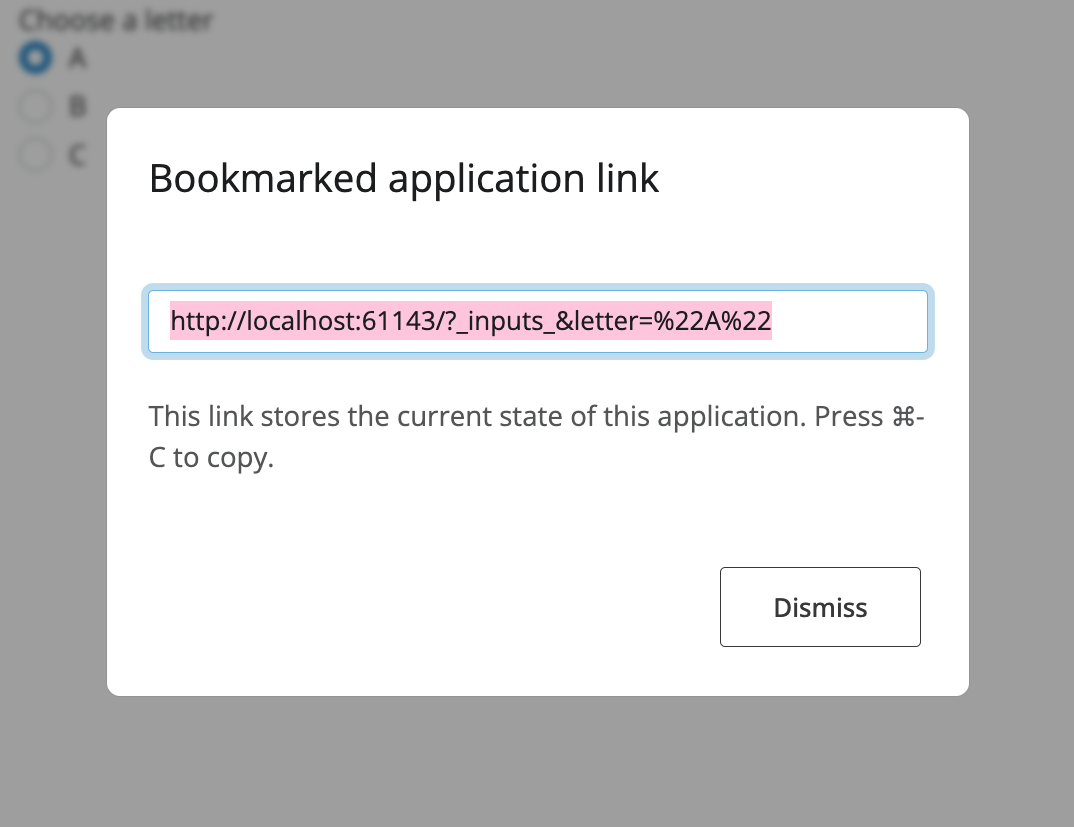
By default, when no on_bookmarked callback is defined, clicking the bookmark button will automatically show this modal.
#| '!! shinylive warning !!': |
#|   shinylive does not work in self-contained HTML documents.
#|   Please set `embed-resources: false` in your metadata.
# | standalone: true
# | components: [editor, viewer]
## file: app.py
from shiny import reactive
from shiny.express import app_opts, input, render, session, ui

# Set the `bookmark_store` option
app_opts(bookmark_store="url")

ui.page_opts(title="Bookmarking Example")

"""
Adjust the inputs below and click the button to create a bookmark.
The URL will update only when you click the button.
"""

# Add the bookmark button
ui.input_bookmark_button(label="Bookmark current state")
ui.hr()

ui.input_slider("n", "Sample size", min=10, max=100, value=30)
ui.input_radio_buttons(
    "dist", "Distribution", choices=["Normal", "Uniform", "Exponential"]
)


@render.plot
def plot():
    import numpy as np
    import matplotlib.pyplot as plt

    if input.dist() == "Normal":
        data = np.random.normal(size=input.n())
    elif input.dist() == "Uniform":
        data = np.random.uniform(size=input.n())
    else:
        data = np.random.exponential(size=input.n())

    fig, ax = plt.subplots()
    ax.hist(data, bins=20)
    return fig
Excluding inputs from Bookmarks
By default, all input values are automatically included in bookmarks. However, some inputs shouldn’t be bookmarked. For example, if you want to make sure a particular input isn’t included in the bookmark and resets to its default value on every app load, you can exclude it:
# Exclude input.n from bookmarking
session.bookmark.exclude.append("n")
Common inputs to exclude:
- Action buttons (they represent one-time actions, not persistent state)
- Password fields (already excluded by default for security)
- Temporary UI state that shouldn’t persist
The session.bookmark.exclude list can be modified at any time during the server function execution, including from within modals.
#| '!! shinylive warning !!': |
#|   shinylive does not work in self-contained HTML documents.
#|   Please set `embed-resources: false` in your metadata.
# | standalone: true
# | components: [editor, viewer]
## file: app.py
from shiny import reactive
from shiny.express import app_opts, input, render, session, ui

# Set the `bookmark_store` option
app_opts(bookmark_store="url")

ui.page_opts(title="Bookmarking Example")

"""
Adjust the inputs below and click the button to create a bookmark.
The URL will update only when you click the button.
"""

# Add the bookmark button
ui.input_bookmark_button(label="Bookmark current state")
ui.hr()

ui.input_slider("n", "Sample size", min=10, max=100, value=30)
# Do not bookmark input.n
session.bookmark.exclude.append("n")

ui.input_radio_buttons(
    "dist", "Distribution", choices=["Normal", "Uniform", "Exponential"]
)


@render.plot
def plot():
    import numpy as np
    import matplotlib.pyplot as plt

    if input.dist() == "Normal":
        data = np.random.normal(size=input.n())
    elif input.dist() == "Uniform":
        data = np.random.uniform(size=input.n())
    else:
        data = np.random.exponential(size=input.n())

    fig, ax = plt.subplots()
    ax.hist(data, bins=20)
    return fig
Bookmarking Tabs
When using tabbed interfaces, you’ll want to bookmark which tab is active. To enable this, add an id parameter to your tabset. The active tab will then be automatically included in the bookmark state.
#| '!! shinylive warning !!': |
#|   shinylive does not work in self-contained HTML documents.
#|   Please set `embed-resources: false` in your metadata.
# | standalone: true
# | components: [editor, viewer]
## file: app.py
from shiny import reactive
from shiny.express import app_opts, input, render, session, ui

# Set the `bookmark_store` option
app_opts(bookmark_store="url")

app_url = reactive.value("")


# Integrate bookmarking callbacks
@session.bookmark.on_bookmarked
async def _(url: str):
    await session.bookmark.update_query_string(url)
    app_url.set(url)  # Store for display


@reactive.effect
@reactive.event(input.main_tabs, ignore_init=True)
async def _():
    await session.bookmark()


ui.page_opts(title="Tabbed App with Bookmarking")

ui.markdown(
    """
Switch between tabs and click the button to bookmark.
The active tab will be saved in the URL.

Latest Bookmarked URL:
"""
)


@render.express
def _():
    ui.code(app_url())


ui.hr()

# Add id parameter to enable tab bookmarking
with ui.navset_tab(id="main_tabs"):
    with ui.nav_panel("Plot"):
        ui.input_slider("n", "Sample size", min=10, max=100, value=50)

        @render.plot
        def plot():
            import numpy as np
            import matplotlib.pyplot as plt

            data = np.random.normal(size=input.n())
            fig, ax = plt.subplots()
            ax.hist(data, bins=20)
            ax.set_title("Normal Distribution")
            return fig

    with ui.nav_panel("Data"):
        "Data analysis content here"

    with ui.nav_panel("About"):
        "About this application"
Bookmarking Styles
Bookmarks are created by calling await session.bookmark(). This function captures the current state of all input values (except those explicitly excluded) and saves it according to the configured bookmarking style (URL or server).
Shiny provides two approaches for storing bookmarked state:
URL Bookmarking
With URL bookmarking, the application state is encoded directly in the URL query string. This makes sharing as simple as copying a link, but has some limitations:
Advantages:
- Easy to share - just copy the URL
- No server-side storage required
- Works across any deployment
Limitations:
- URL length limits (~65,000 characters)
- State is visible in the URL
- Not suitable for sensitive data
Example URL:
https://myapp.example.com/?_inputs_&choice=%22B%22&number=42Server-side Bookmarking
With server-side bookmarking, the state is stored on the server with a unique identifier in the URL:
Advantages:
- No character URL size limitations; Data is stored server-side
- State is not visible in URL
- Can include files and large data structures
Limitations:
- Requires server-side storage configuration
- Bookmarks are tied to that server
- May need cleanup policies for old bookmarks
Example URL:
https://myapp.example.com/?_state_id_=d80625dc681e913aUse URL bookmarking if your state can fit in ~65k characters. It’s simpler to set up and more portable. This is great for smaller apps. However, generative-AI apps or apps with data uploads are better suited for server-side bookmarking.
Best Practices
Always make your UI a function (when using Shiny Core syntax) that accepts a
Requestparameter - this is required for bookmarking to work.Update the query string - Use
session.bookmark.update_query_string()in anon_bookmarkedcallback to keep the browser URL in sync.Use URL bookmarking when possible - it’s simpler and more portable than server bookmarking.
Exclude transient inputs - Action buttons, file uploads, and other temporary controls usually shouldn’t be bookmarked.
Test restoration thoroughly - Load your app with bookmarked URLs to ensure state is restored correctly.
Consider URL size limits - Keep bookmarked state compact for URL bookmarking (~65k character limit).
Limitations
URL length limits: Browsers limit URL length to approximately 65,000 characters. Use server bookmarking for larger state.
File uploads: File inputs should not be bookmarked with URL storage with most files being too large to store within the URL. With server storage, you need custom logic to save/restore files.
Security: URL bookmarks are visible to users / their browser. Do not include sensitive information in URL bookmarks.
See Also
- Advanced Bookmarking - Custom values, lifecycle callbacks, and server-side storage
- Bookmarking with Modules - Using bookmarking with Shiny modules
- Modules - Organizing code with modules
- Persistent Storage - Saving data between sessions
- Reactivity Patterns - Working with reactive values