Code Editor
#| '!! shinylive warning !!': |
#|   shinylive does not work in self-contained HTML documents.
#|   Please set `embed-resources: false` in your metadata.
#| standalone: true
#| components: [viewer]
#| viewerHeight: 380

from shiny import App, render, ui

app_ui = ui.page_fluid(
    ui.input_code_editor(
        "code",
        "Enter Python code:",
        "def greet(name):\n    return f'Hello, {name}!'\n\nprint(greet('World'))",
        language="python",
    ),
    ui.output_code("value"),
    {"class": "p-3 mx-auto"},
)

def server(input, output, session):
    @render.code
    def value():
        return input.code()

app = App(app_ui, server)Relevant Functions
-
ui.input_code_editor
ui.input_code_editor(id, label=None, value='', *, language='plain', height='auto', width='100%', theme_light='github-light', theme_dark='github-dark', read_only=False, line_numbers=None, word_wrap=None, tab_size=4, indentation='space', fill=True, **kwargs) -
ui.update_code_editor
ui.update_code_editor(id, *, label=None, value=None, language=None, theme_light=None, theme_dark=None, read_only=None, line_numbers=None, word_wrap=None, tab_size=None, indentation=None, session=None)
Details
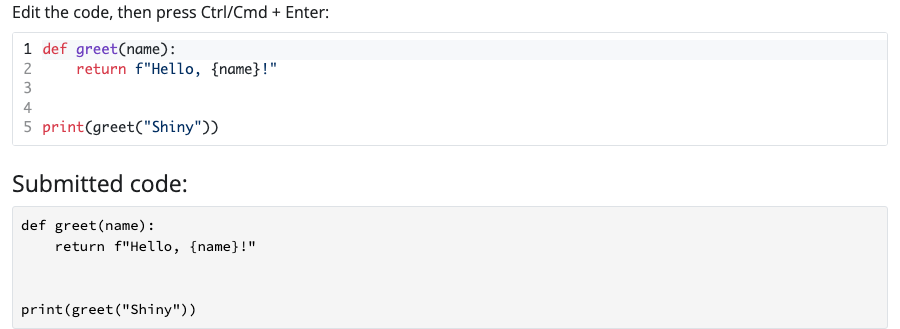
A code editor input provides an interactive code editing experience with syntax highlighting, line numbers, and keyboard shortcuts. It’s powered by Prism Code Editor and supports many programming languages.
To add a code editor to your app:
Add
ui.input_code_editor()to the UI of your app to create a code editor. Where you call this function will determine where the code editor will appear within the app’s layout.Specify the
idandlabelparameters ofui.input_code_editor()to define the identifier and label of the code editor.Set the initial code with the
valueparameter, and specify the programminglanguagefor syntax highlighting. The editor supports many languages including"python","javascript","r","sql","html","css","json", and"markdown".
The value of an input component is accessible as a reactive value within the server() function. To access the value of a code editor:
- Use
input.<code_editor_id>()(e.g.,input.code()) to access the current code as a string.
Unlike a text area that updates on every keystroke, the code editor only sends its value to the server when the user presses Ctrl/Cmd + Enter or when the editor loses focus.
To update the editor from the server, call ui.update_code_editor() within a reactive effect. You can change the value, language, themes, and options like read_only or line_numbers.
The editor automatically switches between theme_light and theme_dark when used with Dark Mode Switch.
Variations
Different programming languages
The code editor supports syntax highlighting for many programming languages including Python, JavaScript, R, SQL, HTML, CSS, JSON, Markdown, and more. Set the language parameter to enable syntax highlighting for your preferred language.
#| '!! shinylive warning !!': |
#|   shinylive does not work in self-contained HTML documents.
#|   Please set `embed-resources: false` in your metadata.
#| standalone: true
#| components: [viewer]
#| viewerHeight: 620

from shiny import App, ui

app_ui = ui.page_fluid(
    ui.input_code_editor(
        "python_code",
        "Python",
        "def hello():\n    print('Hello, Python!')",
        language="python",
    ),
    ui.input_code_editor(
        "javascript_code",
        "JavaScript",
        "function hello() {\n  console.log('Hello, JavaScript!');\n}",
        language="javascript",
    ),
    ui.input_code_editor(
        "sql_code",
        "SQL",
        "SELECT * FROM users\nWHERE active = true;",
        language="sql",
    ),
    {"class": "p-3 mx-auto"},
)

def server(input, output, session):
    pass

app = App(app_ui, server)from shiny.express import ui
ui.input_code_editor(
"python_code",
"Python",
"def hello():\n print('Hello, Python!')",
language="python",
)
ui.input_code_editor(
"javascript_code",
"JavaScript",
"function hello() {\n console.log('Hello, JavaScript!');\n}",
language="javascript",
)
ui.input_code_editor(
"sql_code",
"SQL",
"SELECT * FROM users\nWHERE active = true;",
language="sql",
)from shiny import App, ui
app_ui = ui.page_fluid(
ui.input_code_editor(
"python_code",
"Python",
"def hello():\n print('Hello, Python!')",
language="python",
),
ui.input_code_editor(
"javascript_code",
"JavaScript",
"function hello() {\n console.log('Hello, JavaScript!');\n}",
language="javascript",
),
ui.input_code_editor(
"sql_code",
"SQL",
"SELECT * FROM users\nWHERE active = true;",
language="sql",
),
)
def server(input, output, session):
pass
app = App(app_ui, server)Update the editor from the server
Call ui.update_code_editor() within a reactive effect to change the editor’s value, language, or other options from the server. Here, choosing a language swaps in a matching code sample, and the switch toggles read_only.
#| '!! shinylive warning !!': |
#|   shinylive does not work in self-contained HTML documents.
#|   Please set `embed-resources: false` in your metadata.
#| standalone: true
#| components: [viewer]
#| viewerHeight: 420

from shiny import App, reactive, ui

code_samples = {
    "python": "def greet(name):\n    return f'Hello, {name}!'",
    "javascript": "function greet(name) {\n  return `Hello, ${name}!`;\n}",
    "sql": "SELECT greeting FROM greetings\nWHERE name = 'World';",
}

app_ui = ui.page_fluid(
    ui.input_select(
        "language",
        "Language:",
        choices=list(code_samples.keys()),
        selected="python",
    ),
    ui.input_switch("read_only", "Read only", value=False),
    ui.input_code_editor(
        "code",
        "Code editor:",
        code_samples["python"],
        language="python",
    ),
    {"class": "p-3 mx-auto"},
)

def server(input, output, session):
    @reactive.effect
    @reactive.event(input.language)
    def _():
        ui.update_code_editor(
            "code",
            value=code_samples[input.language()],
            language=input.language(),
        )

    @reactive.effect
    @reactive.event(input.read_only)
    def _():
        ui.update_code_editor("code", read_only=input.read_only())

app = App(app_ui, server)from shiny import reactive
from shiny.express import input, ui
code_samples = {
"python": "def greet(name):\n return f'Hello, {name}!'",
"javascript": "function greet(name) {\n return `Hello, ${name}!`;\n}",
"sql": "SELECT greeting FROM greetings\nWHERE name = 'World';",
}
ui.input_select(
"language",
"Language:",
choices=list(code_samples.keys()),
selected="python",
)
ui.input_switch("read_only", "Read only", value=False)
ui.input_code_editor(
"code",
"Code editor:",
code_samples["python"],
language="python",
)
@reactive.effect
@reactive.event(input.language)
def _():
ui.update_code_editor(
"code",
value=code_samples[input.language()],
language=input.language(),
)
@reactive.effect
@reactive.event(input.read_only)
def _():
ui.update_code_editor("code", read_only=input.read_only()) from shiny import App, reactive, ui
code_samples = {
"python": "def greet(name):\n return f'Hello, {name}!'",
"javascript": "function greet(name) {\n return `Hello, ${name}!`;\n}",
"sql": "SELECT greeting FROM greetings\nWHERE name = 'World';",
}
app_ui = ui.page_fluid(
ui.input_select(
"language",
"Language:",
choices=list(code_samples.keys()),
selected="python",
),
ui.input_switch("read_only", "Read only", value=False),
ui.input_code_editor(
"code",
"Code editor:",
code_samples["python"],
language="python",
),
)
def server(input, output, session):
@reactive.effect
@reactive.event(input.language)
def _():
ui.update_code_editor(
"code",
value=code_samples[input.language()],
language=input.language(),
)
@reactive.effect
@reactive.event(input.read_only)
def _():
ui.update_code_editor("code", read_only=input.read_only())
app = App(app_ui, server)Variation Showcase
A live kitchen sink of all possible parameters for the Code Editor in Shiny Core and Shiny Express.
See also: Text Area, Submit Textarea