Submit Textarea
#| '!! shinylive warning !!': |
#|   shinylive does not work in self-contained HTML documents.
#|   Please set `embed-resources: false` in your metadata.
#| standalone: true
#| components: [viewer]
#| viewerHeight: 260

from shiny import App, render, ui

app_ui = ui.page_fluid(
    ui.input_submit_textarea(
        "message",
        "Compose your message:",
        placeholder="Type a message, then press Ctrl+Enter or click the button...",
    ),
    ui.output_code("value"),
    {"class": "p-3 mx-auto"},
)

def server(input, output, session):
    @render.code
    def value():
        if "message" in input:
            return f"You submitted: {input.message()}"
        return "Nothing submitted yet."

app = App(app_ui, server)from shiny import App, render, ui
app_ui = ui.page_fluid(
ui.input_submit_textarea("message", "Enter your message:"),
ui.output_code("value"),
)
def server(input, output, session):
@render.code
def value():
if "message" in input:
return f"You submitted: {input.message()}"
return "Nothing submitted yet."
app = App(app_ui, server)Relevant Functions
-
ui.input_submit_textarea
ui.input_submit_textarea(id, label=None, *, placeholder=None, value='', width='min(680px, 100%)', rows=1, button=None, toolbar=None, submit_key='enter+modifier', **kwargs) -
ui.update_submit_textarea
ui.update_submit_textarea(id, *, value=None, placeholder=None, label=None, submit=False, focus=False, session=None)
Details
A submit textarea is a multi-line text input with explicit submission via a button or keyboard shortcut. Unlike a regular Text Area that sends its value on every change, this component only updates the server when the user explicitly submits. This makes it ideal for chat interfaces, comment forms, or any scenario where users compose and review text before sending it.
To add a submit textarea to your app:
Add
ui.input_submit_textarea()to the UI of your app to create the input. Where you call this function will determine where it will appear within the app’s layout.Specify the
idandlabelparameters ofui.input_submit_textarea()to define the identifier and label of the input.Optionally set a
placeholderhint, the initial number ofrows(the textarea auto-expands as users type), or atoolbarof extra UI elements displayed next to the submit button.
The value of an input component is accessible as a reactive value within the server() function. To access the value of a submit textarea:
Use
input.<submit_textarea_id>()(e.g.,input.message()) to access the submitted text as a string.The server doesn’t receive a value until the user first submits, so use
if "<submit_textarea_id>" in inputto check whether anything has been submitted before reading the value.
Users submit with Ctrl+Enter (or Cmd+Enter on Mac) or by clicking the submit button, which is a task button that shows a busy indicator while the server processes the submission. Set submit_key="enter" to submit with just Enter instead.
To customize the submit button itself, pass your own via the button parameter. Use a ui.input_task_button() so it keeps the built-in busy indicator and auto-disables until the next reactive flush. If submitting kicks off a long-running job, that button can also be bound to a reactive.extended_task with ui.bind_task_button().
To update the input from the server, call ui.update_submit_textarea() within a reactive effect. You can change the value, placeholder, or label, move keyboard focus to the input, or set submit=True to submit the updated value programmatically.
Variations
Submit on Enter key
By default, users must press Ctrl+Enter (or Cmd+Enter on Mac) to submit, which helps prevent accidental submissions. Set submit_key="enter" to submit with just the Enter key; users can still insert newlines with Shift+Enter.
#| '!! shinylive warning !!': |
#|   shinylive does not work in self-contained HTML documents.
#|   Please set `embed-resources: false` in your metadata.
#| standalone: true
#| components: [viewer]
#| viewerHeight: 260

from shiny import App, render, ui

app_ui = ui.page_fluid(
    ui.input_submit_textarea(
        "quick_message",
        "Quick message:",
        submit_key="enter",
        placeholder="Press Enter to submit, Shift+Enter for a new line",
    ),
    ui.output_code("value"),
    {"class": "p-3 mx-auto"},
)

def server(input, output, session):
    @render.code
    def value():
        if "quick_message" in input:
            return f"You submitted: {input.quick_message()}"
        return "Nothing submitted yet."

app = App(app_ui, server)from shiny.express import input, render, ui
ui.input_submit_textarea(
"quick_message",
"Quick message:",
submit_key="enter",
placeholder="Press Enter to submit, Shift+Enter for a new line",
)
@render.code
def value():
if "quick_message" in input:
return f"You submitted: {input.quick_message()}"
return "Nothing submitted yet."from shiny import App, render, ui
app_ui = ui.page_fluid(
ui.input_submit_textarea(
"quick_message",
"Quick message:",
submit_key="enter",
placeholder="Press Enter to submit, Shift+Enter for a new line",
),
ui.output_code("value"),
)
def server(input, output, session):
@render.code
def value():
if "quick_message" in input:
return f"You submitted: {input.quick_message()}"
return "Nothing submitted yet."
app = App(app_ui, server)Update the textarea from the server
Call ui.update_submit_textarea() within a reactive effect to change the value, placeholder, or label from the server, or to programmatically submit or focus the input. Here, toolbar buttons clear the textarea or fill in a template.
#| '!! shinylive warning !!': |
#|   shinylive does not work in self-contained HTML documents.
#|   Please set `embed-resources: false` in your metadata.
#| standalone: true
#| components: [viewer]
#| viewerHeight: 300

from shiny import App, reactive, render, ui

app_ui = ui.page_fluid(
    ui.input_submit_textarea(
        "comment",
        "Your comment:",
        placeholder="Type your comment here...",
        rows=2,
        toolbar=[
            ui.input_action_button("clear", "Clear", class_="btn-sm btn-danger"),
            ui.input_action_button("template", "Use template", class_="btn-sm"),
        ],
    ),
    ui.output_code("value"),
    {"class": "p-3 mx-auto"},
)

def server(input, output, session):
    @reactive.effect
    @reactive.event(input.clear)
    def _():
        ui.update_submit_textarea("comment", value="", focus=True)

    @reactive.effect
    @reactive.event(input.template)
    def _():
        ui.update_submit_textarea(
            "comment",
            value="Thank you for your feedback. We appreciate your input!",
        )

    @render.code
    def value():
        if "comment" in input:
            return f"You submitted: {input.comment()}"
        return "Nothing submitted yet."

app = App(app_ui, server)from shiny import reactive
from shiny.express import input, render, ui
ui.input_submit_textarea(
"comment",
"Your comment:",
placeholder="Type your comment here...",
rows=2,
toolbar=[
ui.input_action_button("clear", "Clear", class_="btn-sm btn-danger"),
ui.input_action_button("template", "Use template", class_="btn-sm"),
],
)
@reactive.effect
@reactive.event(input.clear)
def _():
ui.update_submit_textarea("comment", value="", focus=True)
@reactive.effect
@reactive.event(input.template)
def _():
ui.update_submit_textarea(
"comment",
value="Thank you for your feedback. We appreciate your input!",
)
@render.code
def value():
if "comment" in input:
return f"You submitted: {input.comment()}"
return "Nothing submitted yet."from shiny import App, reactive, render, ui
app_ui = ui.page_fluid(
ui.input_submit_textarea(
"comment",
"Your comment:",
placeholder="Type your comment here...",
rows=2,
toolbar=[
ui.input_action_button("clear", "Clear", class_="btn-sm btn-danger"),
ui.input_action_button("template", "Use template", class_="btn-sm"),
],
),
ui.output_code("value"),
)
def server(input, output, session):
@reactive.effect
@reactive.event(input.clear)
def _():
ui.update_submit_textarea("comment", value="", focus=True)
@reactive.effect
@reactive.event(input.template)
def _():
ui.update_submit_textarea(
"comment",
value="Thank you for your feedback. We appreciate your input!",
)
@render.code
def value():
if "comment" in input:
return f"You submitted: {input.comment()}"
return "Nothing submitted yet."
app = App(app_ui, server)Variation Showcase
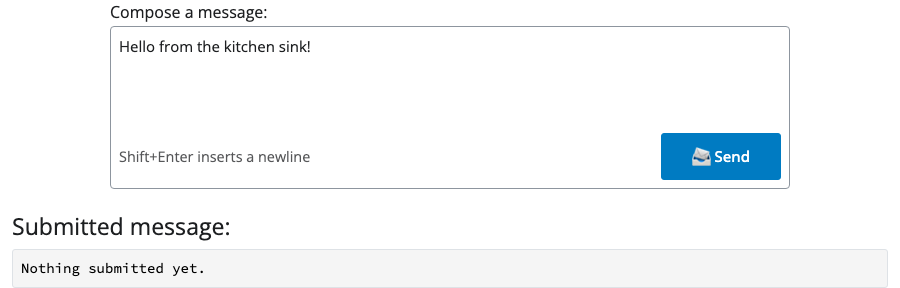
A live kitchen sink of all possible parameters for the Submit Textarea in Shiny Core and Shiny Express.
See also: Text Area, Code Editor, Chat